Where Does Data Come From?#
Historically, datasets arrived through organized channels: government surveys, institutional studies, corporate databases. Today, data spills from everyday systems. Almost every action, transaction, or device leaves a trace.
Common sources include:
transactional databases
sensors and wearables
web APIs
web scraping
user interactions
application logs
Some sources deliver structured data; others arrive messy and require transformation before analysis.
Scraping vs. APIs#
When acquiring data from the web, two patterns are common: web scraping and APIs.
Web scraping imitates a browser, reading HTML and extracting what a human would see. It is useful when no official data interface exists, but fragile and sensitive to ethical and legal boundaries.
APIs, in contrast, are explicit contracts:
“If you send a structured request, I will send structured information.”
APIs typically return machine-readable data (often JSON), avoiding the need to parse HTML manually.
Before scraping, it is always worth checking if an API exists.
How Web Scraping Works (Conceptual)#
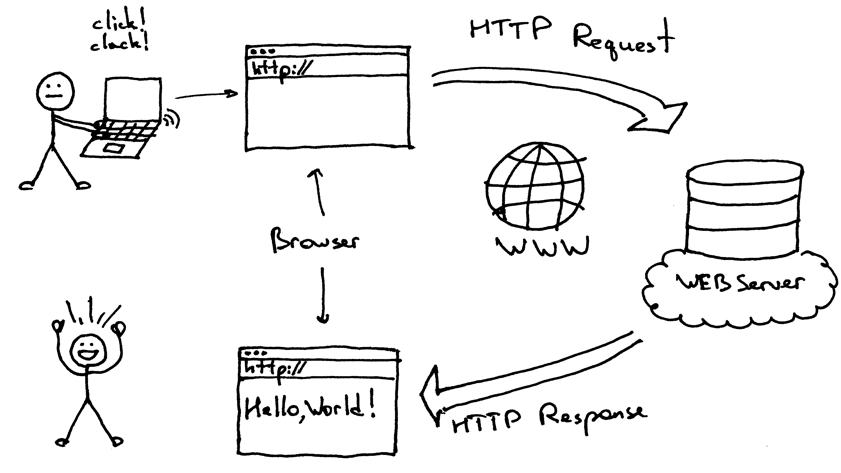
Your script sends an HTTP GET request to a URL.
The server returns an HTML page.
Your program parses and extracts the relevant parts.
(a) Beautiful Soup and Parsing HTML#
When websites lack an API, we fall back to HTML, the layer designed for humans. Beautiful Soup converts that visual layer into structured data.
BeautifulSoup is a Python library for parsing and extracting information from HTML; it takes the raw HTML returned by a website and lets you navigate and extract useful parts such as tables, links, or text.
HTML is hierarchical: tags contain tags, attributes provide meaning, and text sits inside. Beautiful Soup lets us locate elements (div, table, span) and extract text, links, or tabular content.
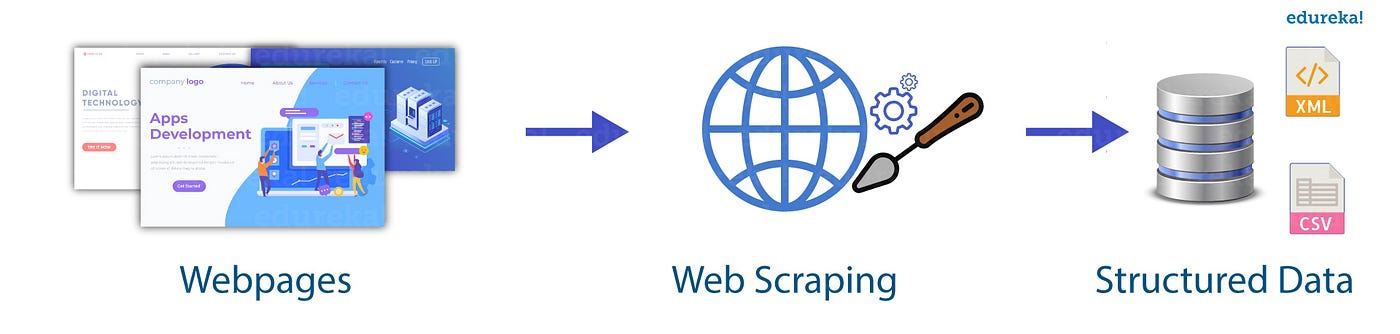
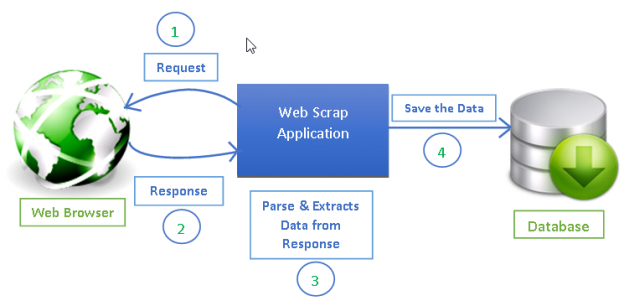

Figure X. HTML-based scraping workflow: identify elements visually, locate tags, extract content, convert to structured data.
Scraping is useful for product data, weather reports, job postings, and research tables — information that exists publicly but without a formal data interface.
Tiny Example: Requests + Beautiful Soup#
import requests
from bs4 import BeautifulSoup

url = "https://example.com"
html = requests.get(url).text
soup = BeautifulSoup(html, "html.parser")

titles = [tag.text for tag in soup.find_all("h2")]
Pattern: download → parse → select → extract → clean
Not every page has the same structure, so scraping often involves inspection and adaptation.
Bonus Trick: Scraping Tables with pandas Pandas can parse HTML tables directly:
import pandas as pd

df_list = pd.read_html("https://example.com/table")
df_list[0].head()
If the page contains “< table > … < /table >” tags, this often works instantly; no tagging, no loops, no manual parsing.
BONUS Pandas Example: Scraping Population Data from an HTML Table#
Suppose you want to collect the latest population estimates for U.S. states. The site has no public API, but shows an HTML table visible in the browser; a perfect case for scraping.
The page might display data like this:
State |
2024 Population |
Growth Rate |
Area (sq mi) |
Density (per sq mi) |
|---|---|---|---|---|
California |
39,074,000 |
-0.59% |
163,695 |
240 |
Texas |
31,161,000 |
+1.44% |
268,597 |
116 |
Florida |
23,655,000 |
+1.37% |
65,758 |
345 |
… |
… |
… |
… |
… |
Because this data lives inside HTML <table> tags, we can use requests to download the page, BeautifulSoup to parse the HTML, and then convert the table into a Pandas DataFrame. Here is the conceptual Python snippet that accomplishes this:
import requests
from bs4 import BeautifulSoup
import pandas as pd

# 1. Fetch the HTML
url = "https://worldpopulationreview.com/states"
response = requests.get(url)
html = response.text

# 2. Parse with BeautifulSoup
soup = BeautifulSoup(html, "html.parser")

# 3. Find the main table on the page
table = soup.find("table")

# 4.1 Extract rows
rows = table.find_all("tr")

# 4.2 Loop over the rows of the table
data = []
for row in rows:
    # Get all header or data cells in this row
    cells = row.find_all(["td", "th"])
    # Extract the text and strip extra spaces
    texts = [cell.get_text(strip=True) for cell in cells]
    if texts:  # skip empty rows
        data.append(texts)

# 5. First row is the header, the rest is the body
header = data[0]
body = data[1:]

# 6. Build a DataFrame from the scraped data
df = pd.DataFrame(body, columns=header)

# Take a quick look
df.head()
Once in a DataFrame df, the data becomes programmable: you can clean, convert types, sort, filter, and analyze.
Why Scraping Is Fragile?#
Scrapers often break because HTML is designed for humans, not for machines. Small changes can cause failure:
renaming CSS classes
changing layout
adding ads or pop-ups
switching to JavaScript-rendered tables
Contrast:
APIs are contracts
HTML is performance
APIs are meant for machines; HTML is meant for browsers.
Typical API Workflow#
APIs remove the guesswork of scraping by returning structured data directly. The workflow is straightforward:
Send a request (often a
GET) to an API endpointReceive structured data (usually JSON)
Convert the JSON into a DataFrame for analysis
Example (conceptual):
import requests
response = requests.get("https://api.example.com/weather")
data = response.json()
This is the programmatic equivalent of asking a well-behaved machine for information.
(b) RESTful APIs (Representational State Transfer)#
RESTful APIs dominate modern data access: a client requests information, a server processes it, and structured data (often JSON) returns.
RESTful API: A style of API where data is organized as resources (e.g., /users, /repos) accessed using HTTP verbs such as GET, POST, PUT, and DELETE.

Figure 14. High-level overview of a RESTful API: structured request → structured response. Source: Medium
Tiny Example: Requests + RESTful APIs#
The GitHub API is a public RESTful API that returns structured JSON data. Unlike scraping, no HTML parsing is required.
import requests
import pandas as pd

# 1. Send a GET request to a RESTful API endpoint
url = "https://api.github.com/repositories"
response = requests.get(url)

# 2. Parse the JSON response
data = response.json()

# 3. Convert JSON into a DataFrame
df = pd.json_normalize(data)

df.head()
For data science, the key takeaway is practical: RESTful APIs provide predictable, machine-readable access to fresh data. Modern dashboards, pipelines, and ML systems rely on them.
A Note on Etiquette Data availability is not the same as data permission. Good acquisition respects rate limits, terms of service, and the human effort behind the page or system being scraped.