A Beginner’s Working Model#
Before we touch syntax, it helps to understand what Pandas adds to Python.
From Python Objects to DataFrames#
Python already has ways to represent data:
lists ([1, 2, 3])
dictionaries ({“age”: 21, “major”: “CS”})
lists of dictionaries (a common “JSON-like” pattern)
The problem is that none of these act like a table. For example, consider a list of student records:
students = [
    {"name": "Alice", "year": 2025, "major": "CS"},
    {"name": "Bob",   "year": 2024, "major": "Math"},
]
Python can iterate through this, but asking simple questions (“which majors?”, “how many in each year?”, “filter by year”) requires loops, conditionals, and manual bookkeeping.
Pandas provides a format that behaves like a table:
import pandas as pd
df = pd.DataFrame(students)
Now the same questions become natural:
df["major"].value_counts()
df[df["year"] == 2025]
This illustrates the core Pandas philosophy:
Take common data-analysis questions and make them one line instead of a small program.
Core Data Structures#
It’s tempting to think Pandas has only one object — the DataFrame — because it dominates most workflows. But understanding the smaller building block helps.
The strength of Pandas lies in two core objects:
Series: is a single column (one-dimensional labeled array)
Dataframe: a table of columns (two-dimensional labeled data structure)
People often describe the relationship like this:
A DataFrame is a collection of Series that share the same index.
That index part will matter later.
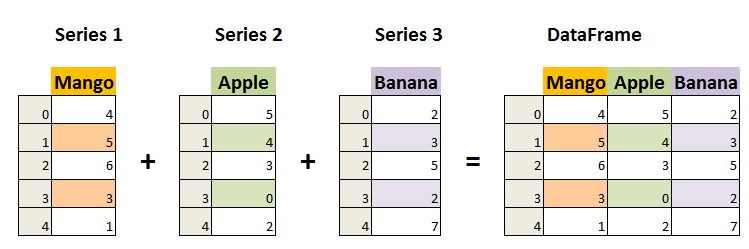
You won’t use Series much explicitly at first, but understanding it later pays off (especially for groupby, apply, or time series).
Series: The One-Dimensional Workhorse#
A Series is a one-dimensional labeled array that can hold any data type. Think of it as a single column in a spreadsheet.
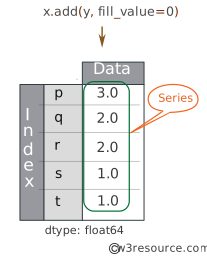
Unlike some arrays that require all elements to be the same type (homogeneous), a Series can store different types of values together, such as numbers, text, or dates. Each value has a label called an index, which can be numbers, words, or timestamps, and you can use it to quickly find or select values. Here are some examples:
How to Create a Series#
A Series can be created directly from a Python list, in which case pandas automatically assigns default numeric indexes (0, 1, 2, …) to each element.
You can also create a Series from a Python dictionary, where the dictionary keys become the index labels and the dictionary values become the Series values. In Python 3.7 and later, the order of the keys is preserved, so the Series keeps the same order as the dictionary
import pandas as pd

# Creating a Series from a list
temperatures = pd.Series([22, 25, 18, 30, 27],
                        index=['Mon', 'Tue', 'Wed', 'Thu', 'Fri'],
                        name='Daily_Temps')
print(temperatures)


# Creating a Series from a Dictionary

grades = {"Math": 90, "English": 85, "Science": 95}
dict_series = pd.Series(grades)

print(dict_series)
Mon    22
Tue    25
Wed    18
Thu    30
Fri    27
Name: Daily_Temps, dtype: int64
Math       90
English    85
Science    95
dtype: int64
import pandas as pd

# Homogeneous Series (all integers)
print("Homogeneous Series \n")
homo_series = pd.Series([10, 20, 30, 40], index=['A', 'B', 'C', 'D'])
print(homo_series)
print(f"The data type is: {homo_series.dtype}\n")

# Heterogeneous Series (mix of int, float, string, bool)
print("Heterogeneous Series \n")
hetero_series = pd.Series([10, 20.5, 'hello', True])
print(hetero_series)
print(f"The data type is: {hetero_series.dtype}")
Homogeneous Series

A    10
B    20
C    30
D    40
dtype: int64
The data type is: int64

Heterogeneous Series

0       10
1     20.5
2    hello
3     True
dtype: object
The data type is: object
DataFrame: The Two-Dimensional Powerhouse#
A DataFrame is a two-dimensional labeled data structure, similar to a table with rows and columns. It is the most commonly used object in Pandas.
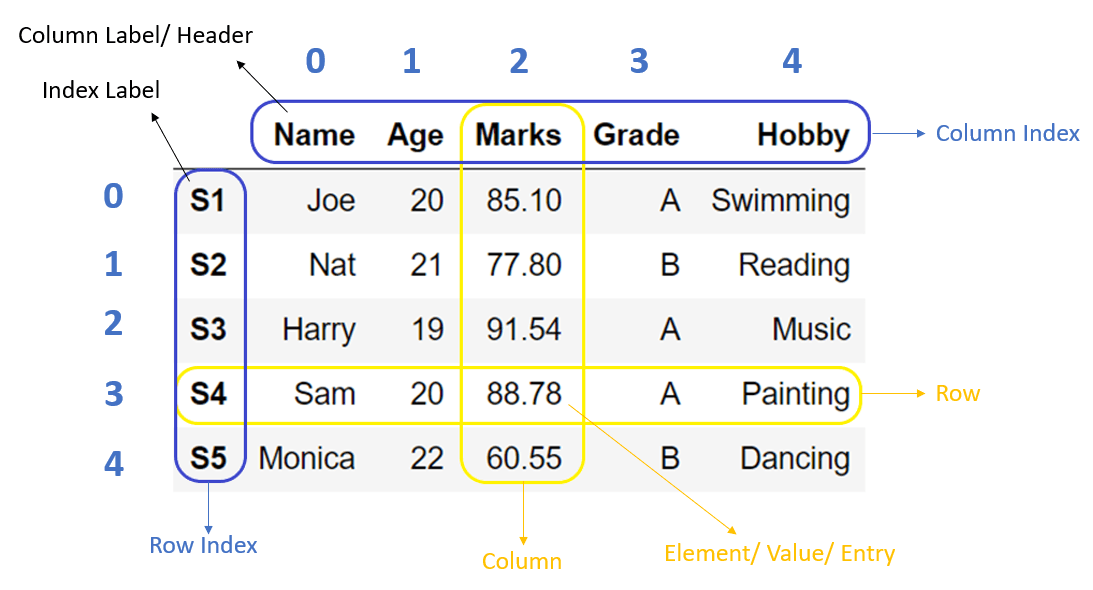
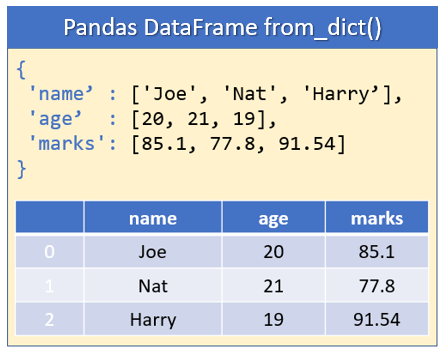
Every DataFrame has an index on the left side. In CSVs it often starts at 0 by default:
      name   year   major
0    Alice   2025    CS
1      Bob   2024  Math
Spreadsheets also have row numbers, but Pandas treats the index as part of the data structure itself. That gives us speed, alignment, joins, slicing, and time-based operations.
Here are some examples:
# Creating a DataFrame from a dictionary
data = {
    'Name': ['Alice', 'Bob', 'Charlie', 'Diana'],
    'Age': [25, 30, 35, 28],
    'City': ['New York', 'London', 'Paris', 'Tokyo']
}

df = pd.DataFrame(data)
print(df)
      Name  Age      City
0    Alice   25  New York
1      Bob   30    London
2  Charlie   35     Paris
3    Diana   28     Tokyo
import pandas as pd

# Create a simple dataset
data = {
    'Product': ['Apple', 'Banana', 'Cherry', 'Date'],
    'Price': [1.20, 0.50, 3.00, 2.50],
    'Stock': [45, 120, 15, 80]
}

# Create DataFrame
df = pd.DataFrame(data)

# Display basic information
print("Our DataFrame:")
print(df)
print("\nData types:")
print(df.dtypes)
print("\nBasic statistics:")
print(df.describe())
Our DataFrame:
  Product  Price  Stock
0   Apple    1.2     45
1  Banana    0.5    120
2  Cherry    3.0     15
3    Date    2.5     80

Data types:
Product        str
Price      float64
Stock        int64
dtype: object

Basic statistics:
         Price       Stock
count  4.00000    4.000000
mean   1.80000   65.000000
std    1.15181   45.276926
min    0.50000   15.000000
25%    1.02500   37.500000
50%    1.85000   62.500000
75%    2.62500   90.000000
max    3.00000  120.000000