import networkx as nx
import matplotlib.pyplot as plt
import numpy as np
Graph Featurization#
Raw graph structure alone is not always enough for machine learning. Featurization converts graph structure and node/edge properties into numeric vectors that models can consume.
Why Featurization?#
Graphs are inherently relational, but most ML models expect fixed-size numeric inputs. Featurization bridges this gap.
Types of Graph Features#
There are four main types:
Type |
What it captures |
Examples |
|---|---|---|
1. Graph-level features |
Properties of the whole graph |
Diameter, density, spectral features |
2. Edge features |
Properties of connections |
Weight, transaction amount, timestamp |
3. Node features |
Properties of individual nodes |
Age, degree, label |
Structural features |
Topological role of a node |
Centrality, clustering coefficient, motif count |
In Graph Neural Networks, the model learns to aggregate these features across multi-hop neighborhoods automatically.
1. Graph-Level Features (Global View)#
Describe the entire graph as a whole.
What they capture:#
Overall connectivity
Global structure
Network complexity
Common Features:#
Diameter → longest shortest path in the graph
Average path length → average distance between nodes
Density → how many edges exist vs possible edges
Modularity → strength of community structure
Example:#
Social network: High density → many people are connected; Low diameter → information spreads quickly.
Used in: Graph classification (e.g., molecule type, network type)
2. Edge-Level Features (Relationship View)#
Describe connections between two nodes.
What they capture:#
Strength or nature of relationships
Likelihood of future connections
Common Features:#
Weight → distance, cost, interaction frequency
Common neighbors → shared connections
Jaccard similarity → similarity between neighborhoods
Edge betweenness → importance of an edge
Example:#
E-commerce:
Edge = user → product
Weight = number of purchases
Social network:
Two users with many common friends → high similarity
Used in: Link prediction, Recommendation systems, Fraud detection.
3. Node-Level Features (Local View — Focus)#
Describe individual nodes. There are two ways - via “Degree” and via “Centrality”
(a) Degree:#
Number of connections a node has
Types:
In-degree → incoming edges
Out-degree → outgoing edges
Example:#
Twitter:
High in-degree → many followers
High out-degree → follows many people
Interpretation:High degree → more connected → potentially more influence
(b) Centrality (Covered Next Section)#
Centrality measures capture node importance in the network.
Degree Centrality: Measures importance based on the number of direct connections a node has.
Closeness Centrality: Measures how quickly a node can reach all other nodes in the network.
Betweenness Centrality: Measures how often a node lies on the shortest paths between other nodes (bridge nodes).
Eigenvector Centrality: Measures importance by considering not just connections, but how important those neighbors are.
4. Structural Features (Topological Role)#
Describe how a node is positioned in the overall structure.
What they capture:#
Local neighborhood patterns
Role of node in graph structure
Common Features:#
Clustering coefficient → how connected neighbors are
Triangle count → number of triangles a node participates in
Motifs → recurring subgraph patterns
Example:#
Social network:High clustering → tight friend group
Fraud detection: Unusual patterns → suspicious behavior
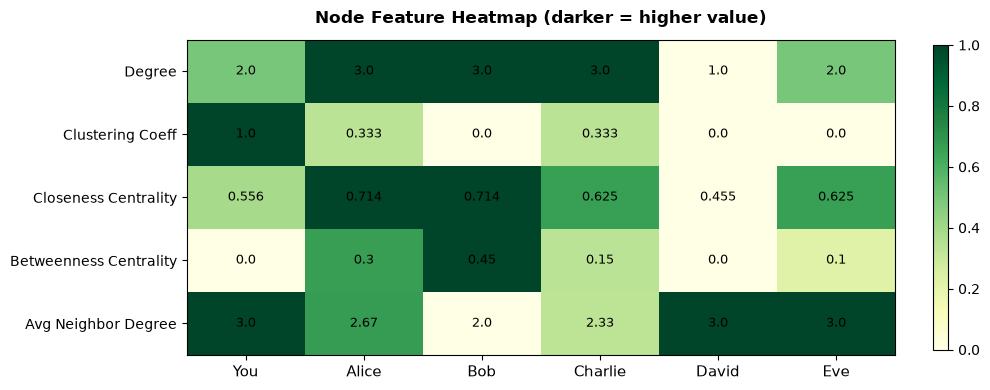
# ── Build a feature table for each node ─────────────────────────────────────
features = {}
for node in G.nodes():
    deg   = G.degree(node)
    cc    = nx.clustering(G, node)
    close = nx.closeness_centrality(G, node)
    betw  = nx.betweenness_centrality(G)[node]
    neigh_degrees = [G.degree(nb) for nb in G.neighbors(node)]
    avg_nb_deg = np.mean(neigh_degrees) if neigh_degrees else 0

    features[node] = {
        'Degree':                      deg,
        'Clustering Coeff':            round(cc,   3),
        'Closeness Centrality':        round(close,3),
        'Betweenness Centrality':      round(betw, 3),
        'Avg Neighbor Degree':         round(avg_nb_deg, 2),
    }

df_features = pd.DataFrame(features).T
df_features.index.name = 'Node'
print("=== Node Feature Matrix (structural features) ===")
print(df_features.to_string())

# Heatmap
fig, ax = plt.subplots(figsize=(10, 4))
data_norm = df_features.apply(lambda col: (col - col.min()) / (col.max() - col.min() + 1e-9))
im = ax.imshow(data_norm.T.values, cmap='YlGn', aspect='auto', vmin=0, vmax=1)
ax.set_xticks(range(len(df_features)))
ax.set_yticks(range(len(df_features.columns)))
ax.set_xticklabels(df_features.index, fontsize=11)
ax.set_yticklabels(df_features.columns, fontsize=10)
for i, col in enumerate(df_features.columns):
    for j, node in enumerate(df_features.index):
        ax.text(j, i, df_features.loc[node, col], ha='center', va='center', fontsize=9)
ax.set_title('Node Feature Heatmap (darker = higher value)', fontsize=12, fontweight='bold', pad=12)
plt.colorbar(im, ax=ax, fraction=0.02)
plt.tight_layout()
plt.show()
=== Node Feature Matrix (structural features) ===
         Degree  Clustering Coeff  Closeness Centrality  Betweenness Centrality  Avg Neighbor Degree
Node
You         2.0             1.000                 0.556                    0.00                 3.00
Alice       3.0             0.333                 0.714                    0.30                 2.67
Bob         3.0             0.000                 0.714                    0.45                 2.00
Charlie     3.0             0.333                 0.625                    0.15                 2.33
David       1.0             0.000                 0.455                    0.00                 3.00
Eve         2.0             0.000                 0.625                    0.10                 3.00